Building a Serverless Docker Security Scanner on AWS
Most developers have a Dockerfile sitting in their repo that runs as root, uses unpinned base images, and installs packages with flags that bloat the image unnecessarily. Tools like Trivy and Hadolint help, but they require local installation and don’t give you an instant, shareable result. I built DocImgAnalizer to solve that — a fully serverless SaaS tool where you paste a Dockerfile or enter a Docker Hub image name and get a security report back in seconds, with no installation required.
This post covers the complete Phase 1 architecture: the design decisions, the Terraform infrastructure, the FastAPI backend running on Lambda, and the GitHub Actions pipeline that deploys it with zero AWS credentials stored anywhere.
The live application is at imgapp.craftingnewtech.com.
What It Does
DocImgAnalizer exposes two core features:
Dockerfile Analysis — Paste any Dockerfile. The backend runs eleven security rules, produces a score from 0 to 100, explains every finding with a fix snippet, and returns a corrected Dockerfile with all issues resolved.
Docker Image Lookup — Enter any Docker Hub image name (e.g., nginx:1.25-alpine). The
backend calls the Docker Hub REST API to retrieve the digest, architecture, OS, compressed
size, and layer count — no image pull, no Docker daemon, no credentials required.
Every scan gets a permanent scan ID. Results are stored for 90 days so users can bookmark or share a direct link.
Architecture
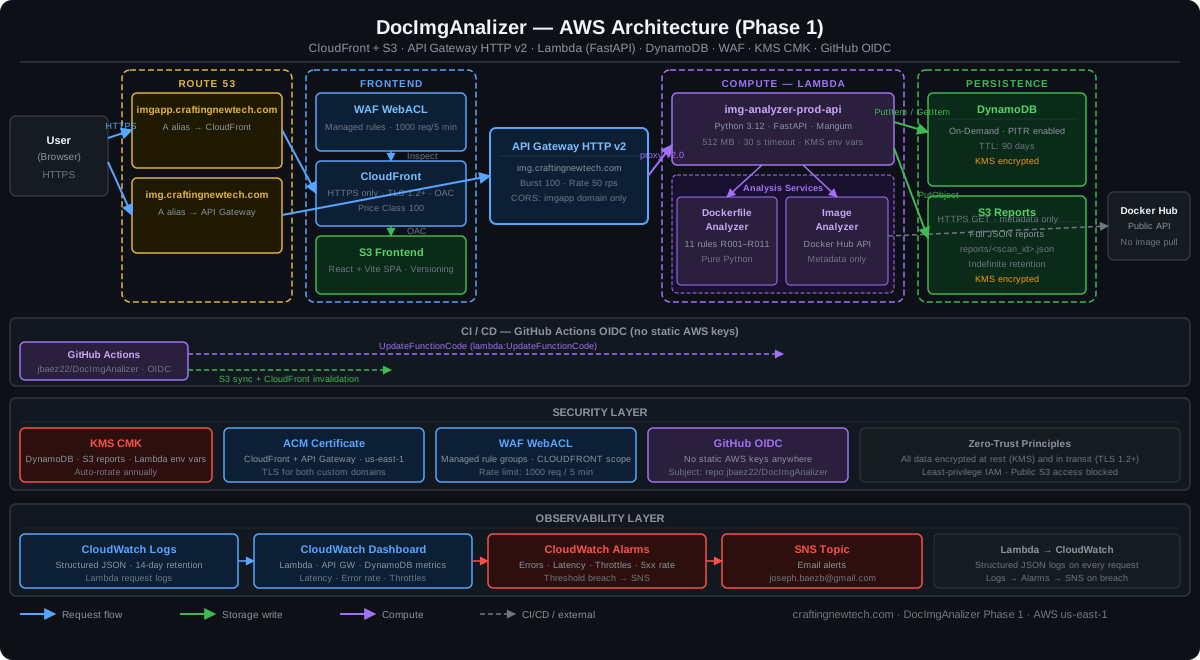
The system is entirely serverless. There are no EC2 instances, no container clusters, and no idle compute costs.
| Component | Technology | Role |
|---|---|---|
| Frontend | React 18 + TypeScript + Vite + Tailwind CSS | Single-page application |
| CDN | CloudFront + WAF | HTTPS, caching, managed WAF rules, rate limiting |
| DNS | Route 53 | A alias records for imgapp.* and img.* |
| API | API Gateway HTTP API v2 | Throttling, CORS enforcement, routing |
| Backend | Lambda — Python 3.12 / FastAPI / Mangum | All business logic |
| Persistence | DynamoDB On-Demand + S3 | Scan metadata (90-day TTL) + full JSON reports |
| Security | KMS CMK + GitHub OIDC | Encryption at rest, zero long-lived AWS credentials |
| Observability | CloudWatch Logs / Dashboard / Alarms + SNS | Structured logs, metrics, email alerts |
Why Serverless?
For a tool with spiky, unpredictable traffic, serverless is the right default. Lambda scales from zero without pre-provisioning, DynamoDB On-Demand handles burst reads and writes without capacity planning, and the entire stack has zero cost at zero traffic. The tradeoff is cold starts — mitigated here by keeping the Lambda package small (boto3 / botocore stripped because they come free with the runtime) and the initialization path fast.
Request and Data Flow
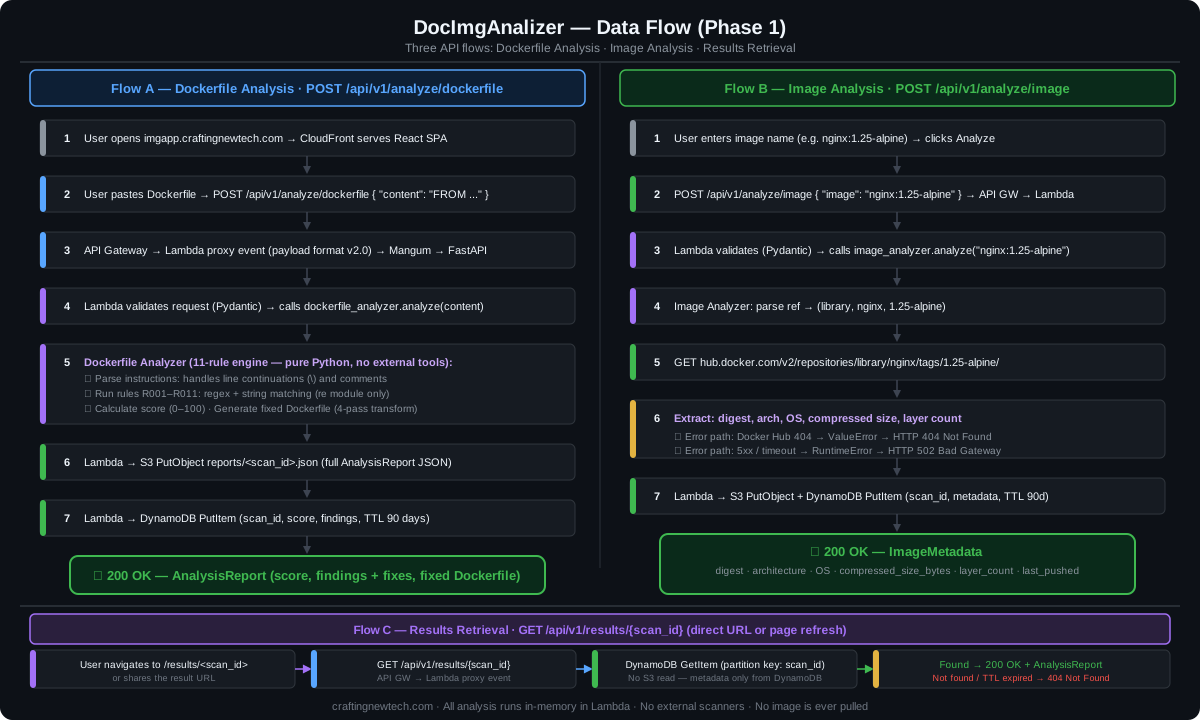
Dockerfile Analysis Path
When a user clicks Analyze, the React SPA posts { "content": "FROM ..." } to
POST /api/v1/analyze/dockerfile. API Gateway proxies the request to Lambda using payload
format v2.0. Mangum translates the Lambda event into an ASGI scope that FastAPI can process.
The Dockerfile Analyzer service then runs four steps:
- Parse — Handles multi-line continuations (
\), inline comments, and empty lines. - Rule evaluation — Eleven rules (R001–R011) using regex and string matching against the parsed instruction list.
- Score calculation — Each violation deducts a weighted penalty. No violations = 100.
- Fix generation — A 4-pass transformation rewrites the Dockerfile with all issues
resolved: pinning the base image tag, adding a
USER 1000instruction, inserting aHEALTHCHECK, inlining package-manager cache flags, replacingnpm installwithnpm ci, and prepending structural guidance for multi-stage builds.
The full report is written to S3 (reports/<scan_id>.json) and a summary item is written to
DynamoDB with a 90-day TTL. The response returns the complete AnalysisReport JSON including
the corrected Dockerfile.
Image Analysis Path
For image lookups, the Image Analyzer service parses the reference into
(namespace, repository, tag) and calls the Docker Hub public REST API:
GET /v2/repositories/{namespace}/{repository}/tags/{tag}/No authentication required for public images. The response is mapped to an ImageMetadata
model (digest, architecture, OS, compressed size in bytes, layer count, tag status, last pushed
timestamp). This is then stored and returned exactly like a Dockerfile scan.
Error handling is explicit and typed: ValueError for 404 → 404 Not Found; RuntimeError
for upstream failures → 502 Bad Gateway.
User Experience
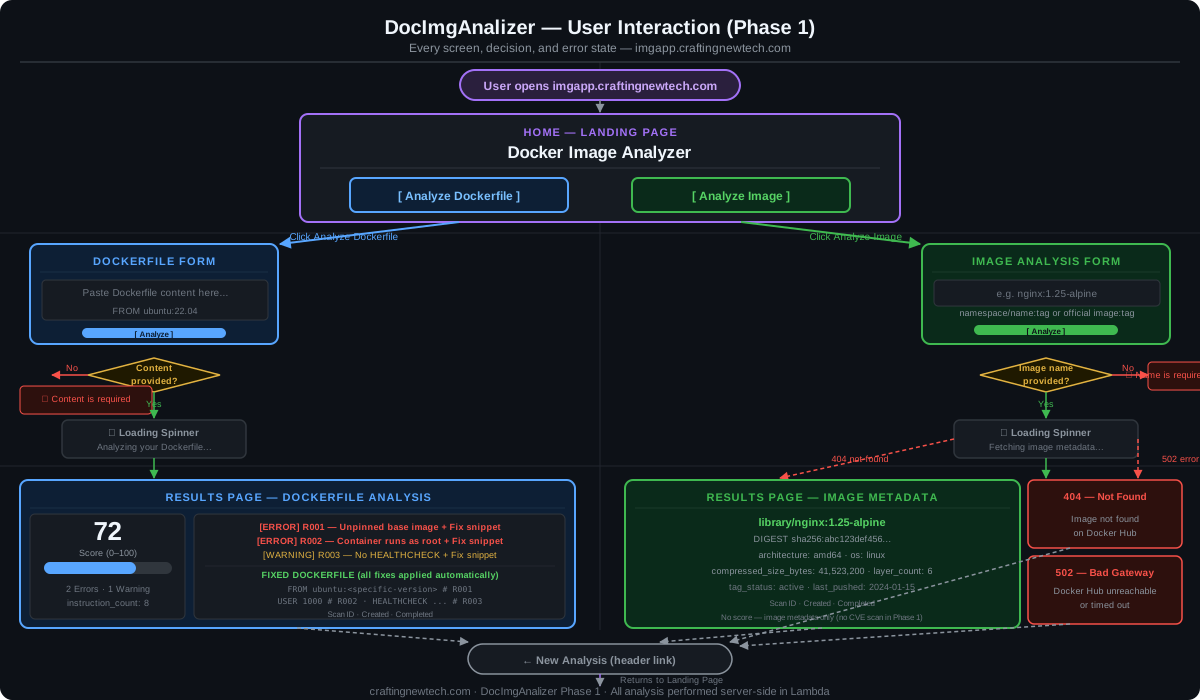
Both workflows share the same UX pattern: input form → inline validation → loading state → results page. Validation runs client-side before the API call to avoid unnecessary round trips.
Dockerfile results show a score gauge, findings grouped by severity (ERROR / WARNING / INFO) with fix snippets, the complete corrected Dockerfile, and metadata (instruction count, stage count, whether the image has a HEALTHCHECK and a non-root USER).
Image results show the layer count badge, full image reference, digest, architecture, OS, compressed size, tag status, and last-pushed date.
Both result pages support direct URL navigation and browser refresh — the frontend fetches the
scan from GET /api/v1/results/<scan_id> on load.
Dockerfile Security Rules
Phase 1 implements eleven rules covering the most impactful security and operational issues found in real-world Dockerfiles.
| Rule | Severity | What It Checks | Score Deduction |
|---|---|---|---|
| R001 | ERROR | Base image uses :latest or has no tag | -20 per occurrence |
| R002 | ERROR | No USER instruction (runs as root), or USER root / USER 0 | -25 per occurrence |
| R003 | WARNING | No HEALTHCHECK instruction | -10 |
| R004 | ERROR | Secret-like key name in ENV or ARG (password, token, api_key, etc.) | -30 per occurrence |
| R005 | ERROR | curl/wget piped to bash/sh — supply-chain risk | -20 per occurrence |
| R006 | WARNING | ADD used for local files — prefer COPY | -5 per occurrence |
| R007 | WARNING | More than one RUN instruction — chain with && to reduce layers | -5 |
| R008 | WARNING | Single-stage build — no builder / runtime stage separation | -10 |
| R009 | WARNING | Final base image is not a minimal variant (not alpine, slim, distroless, Chainguard, or scratch) | -10 |
| R010 | WARNING | Package manager cache not cleaned: apt-get without rm -rf /var/lib/apt/lists/*, pip without --no-cache-dir, apk without --no-cache | -10 (once total) |
| R011 | WARNING | npm install instead of npm ci — not reproducible or lock-file enforced | -5 (once total) |
All eleven rules are implemented in pure Python — no external Docker tooling, no Hadolint
binary, no shell execution. The only standard-library dependency is the re module.
This is deliberate: the entire analysis runs inside the Lambda function with zero system
dependencies.
Security Design
Security was a first-class requirement, not an afterthought.
No long-lived credentials anywhere. The CI/CD pipeline uses GitHub OIDC to assume an IAM role. Lambda gets its permissions from an execution role, not environment variables with keys. Docker Hub is accessed via unauthenticated REST — no credentials needed for public image metadata.
Encryption everywhere. A KMS Customer Managed Key encrypts DynamoDB, the S3 reports bucket, and Lambda environment variables. The key rotates automatically each year.
Layered access control. The S3 frontend bucket blocks all public access and is served
exclusively via CloudFront using Origin Access Control (OAC). The API Gateway CORS policy
allows only https://imgapp.craftingnewtech.com — no wildcard, no localhost in production.
A WAF WebACL on CloudFront enforces managed rule groups and rate-limits to 1,000 requests per
5 minutes. API Gateway throttles to burst 100 / rate 50 rps at the stage level.
Infrastructure as Code
All 11 AWS modules are managed with Terraform (v1.15.6), organized into environment-specific
workspaces under environments/dev/ and environments/prod/.
Module structure
terraform/
├── modules/
│   ├── acm/          # TLS certificates (us-east-1 for CloudFront)
│   ├── api_gateway/  # HTTP API v2, custom domain, access logs
│   ├── cloudfront/   # Distribution, WAF association, OAC
│   ├── cloudwatch/   # Dashboard, metric alarms, SNS topic
│   ├── dynamodb/     # On-demand table, PITR, KMS, TTL attribute
│   ├── github_oidc/  # IAM role + OIDC trust for GitHub Actions
│   ├── kms/          # CMK, key policy, rotation
│   ├── lambda/       # Function, execution role, log group
│   ├── route53/      # A alias records for both domains
│   ├── s3_frontend/  # SPA bucket, block public access, OAC policy
│   └── s3_reports/   # Reports bucket, lifecycle rules, KMS
├── environments/
│   ├── dev/          # dev.tfvars + backend.hcl
│   └── prod/         # prod.tfvars + backend.hcl
State is stored in S3 with native locking (use_lockfile = true), which requires Terraform
= 1.10 and eliminates the need for a DynamoDB lock table.
A few gotchas worth calling out:
- WAFv2 + API Gateway HTTP API v2: AWS does not support associating a REGIONAL WAF with
the
$defaultstage of an HTTP API v2 — the ARN format is rejected. The workaround is WAF on CloudFront (CLOUDFRONT scope) plus throttling and CORS at the API Gateway layer. - IAM descriptions: The IAM API rejects descriptions containing non-ASCII characters
(the allowed ceiling is U+00FF). Em dashes in copy-pasted descriptions will fail silently
until
terraform applyreturns a cryptic error. - S3 lifecycle rules: Every
rule {}block requires an explicitfilter {}block, even for rules that apply to all objects.
CI/CD Pipeline
Pull Request → pr.yml
  ├── Terraform: fmt + validate + plan (plan posted as PR comment)
  ├── Backend:   pytest (35 unit tests) + Trivy IaC + image scan
  ├── Frontend:  ESLint + Vite production build
  └── pr-ready gate (all jobs must pass before merge)

Merge → develop  →  deploy.yml  →  dev environment    (automatic)
Merge → main     →  deploy.yml  →  production          (manual approval gate)
The GitHub OIDC trust policy covers refs/heads/main, refs/heads/develop, and
pull_request events. No static credentials exist in GitHub Secrets — only the IAM role ARN
is stored as a repository variable.
Lambda is built cross-compiled for manylinux2014_x86_64 using pip’s --platform flag.
boto3 and botocore are excluded from the deployment package because the Lambda runtime provides
them, saving ~40 MB. The frontend asset pipeline uses content-hashed filenames for long-term
caching (max-age=31536000) with index.html serving no-cache headers so deployments
propagate immediately. CloudFront invalidates only /index.html on each deploy.
Observability
- Structured JSON logs from Lambda → CloudWatch Logs (14-day retention)
- CloudWatch Dashboard — Lambda error rate, p99 duration, throttle count; API Gateway 4xx / 5xx; DynamoDB consumed read/write capacity units
- CloudWatch Alarms — error rate, high latency, throttle count, 5xx rate
- SNS topic → email alert on any alarm breach
What’s Next
Phase 1 established the core analysis engine and serverless infrastructure. The rule engine
grew from 7 to 11 rules after launch, adding multi-stage build detection (R008), minimal base
image enforcement (R009), package cache cleanup (R010), and npm ci enforcement (R011) —
all implemented in pure Python with no new dependencies.
Possible Phase 2 directions include:
- Vulnerability scanning integration (Trivy on base images — querying CVE databases for OS packages and language dependencies, running in ECS Fargate via SQS async pipeline)
- SBOM generation with Syft — listing every package in the final image layer
- Authenticated sessions for scan history across devices (Cognito)
- Webhook support for CI/CD integration (POST a Dockerfile from a GitHub Action and get a score back as a PR check)
The full source code and Terraform infrastructure are in the DocImgAnalizer repository.
craftingnewtech.com